
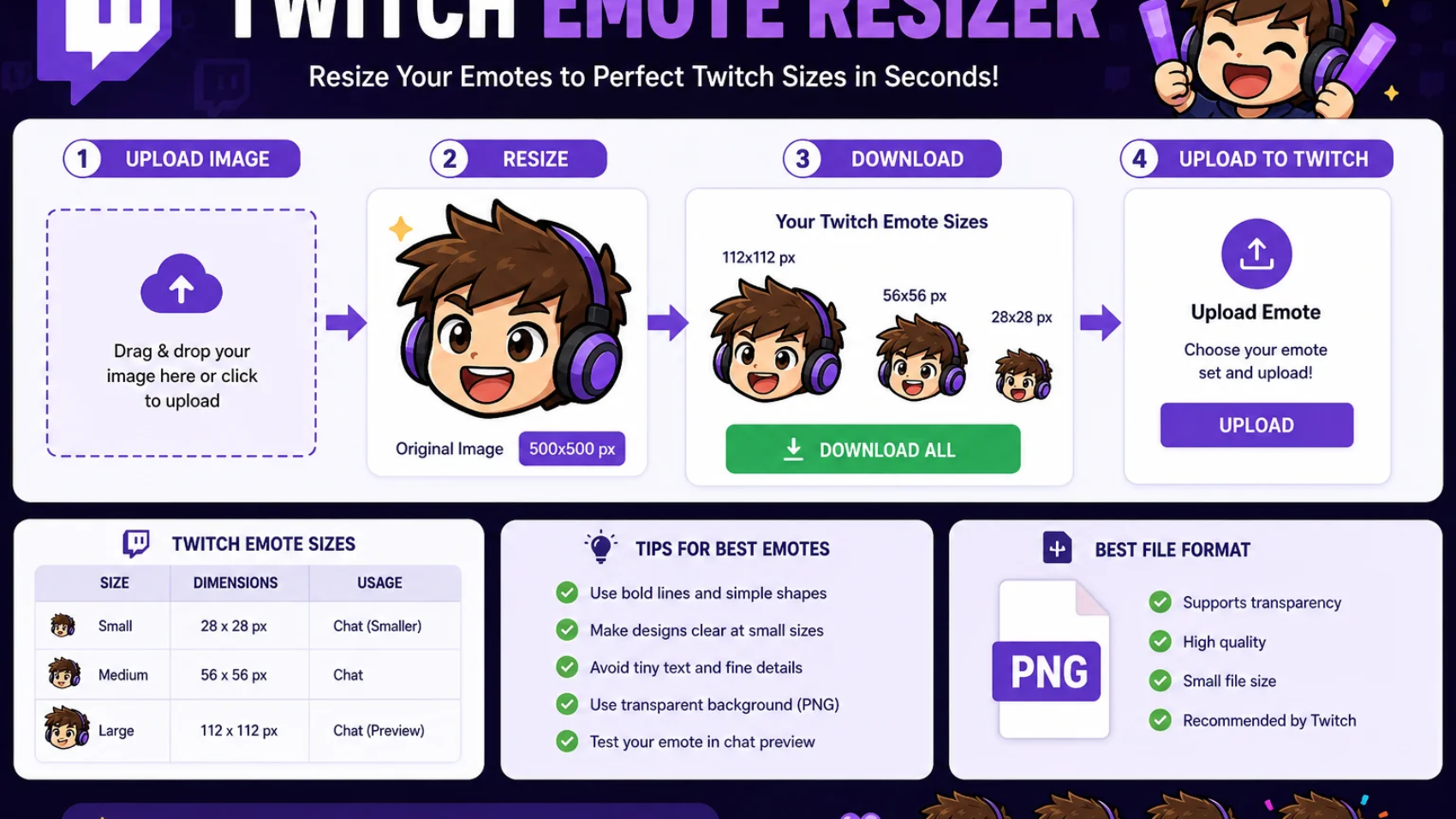
A Twitch emote resizer is a tool that changes the size of emote images for Twitch. It helps streamers create emotes that fit Twitch upload rules. The tool takes one image and makes several smaller versions in a few seconds. This saves time and keeps image quality clear.
Twitch emotes play a big role in channel branding. They help viewers react during live streams. They also create a strong community feeling. Because of this, streamers need emotes that look clean at every size. A good resizing tool helps achieve that goal.
The Twitch emote resizer is one of the best tools for preparing emotes for Twitch. It helps creators resize images without complex editing skills. New streamers and experienced creators both use these tools to save effort and maintain quality.
What Is a Twitch Emote Resizer
A Twitch emote resizer is software or an online tool that converts an image into Twitch-approved dimensions. Twitch requires specific image sizes for emotes. The tool automatically adjusts the image while keeping the design readable and sharp. Most resizers support PNG files because Twitch prefers transparent backgrounds.
The tool can crop, scale, and optimize images. As a result, creators get emotes that display correctly across desktop and mobile devices. Many streamers use these tools before uploading emotes. This process removes manual editing work. It also reduces mistakes that may cause upload rejection. Therefore, a resizer becomes an important part of emote creation.
Why Twitch Emotes Matter for Streamers
Twitch emotes help viewers communicate during streams. Instead of typing long messages, users can send emotes to express reactions. This creates faster and more engaging conversations. Custom emotes also strengthen channel identity. When viewers use channel-specific emotes, they help spread brand recognition.
Over time, these emotes become symbols of the community and its culture. Many successful creators invest time in quality emotes. Clear and attractive emotes often receive more use. Therefore, proper resizing becomes important because viewers see emotes at very small dimensions.
Twitch Emote Size Requirements
Twitch has official size guidelines for emote uploads. Streamers need to follow these requirements to ensure approval. Using the correct dimensions prevents upload errors and quality issues.
| Twitch Emote Size | Purpose |
| 28 x 28 pixels | Small display |
| 56 x 56 pixels | Medium display |
| 112 x 112 pixels | Large display |
These dimensions help Twitch display emotes across different devices. A Twitch emote resizer can generate all required sizes from a single image. This creates consistency across every version of the emote. Creators should also keep file sizes small. Large files may slow uploads or create issues. Therefore, optimization remains an important step during resizing.
How a Twitch Emote Resizer Works
The process starts with an original image. The user uploads the image into the tool. Then the software analyzes the image and prepares it for resizing. Next, the tool generates multiple versions based on Twitch requirements. Many tools also sharpen edges and preserve transparency.
This helps maintain visual quality even at small sizes. Finally, users download the finished files. These files are ready for Twitch upload. The process often takes less than a minute, making it simple for beginners.
Benefits of Using a Twitch Emote Resizer
A resizer saves valuable time. Instead of creating every size manually, users can generate them instantly. This improves workflow and allows streamers to focus on content creation. The tool also improves consistency. Every emote size comes from the same source image.
The appearance remains uniform across all versions. Another benefit is quality preservation. Good resizers use advanced scaling methods. As a result, small images remain readable and attractive during chat activity.
Features to Look for in a Twitch Emote Resizer
Not every resizing tool offers the same features. Some tools provide only basic resizing. Others include optimization and image enhancement options. Look for transparency support when choosing a tool.
Twitch emotes often require transparent backgrounds. This feature keeps the emote professional and clean. Batch resizing is another useful option. It allows users to resize several emotes at once. This feature helps creators who manage large emote collections.
Common Twitch Emote Formats
PNG remains the most popular format for Twitch emotes. It supports transparency and maintains image quality. Therefore, many designers prefer PNG files for uploads. JPEG files are less common because they do not support transparent backgrounds.
They may also introduce compression artifacts around image edges. GIF files serve different purposes on Twitch. Some animated features use GIF-related formats. However, static emotes usually work best in PNG format.
Steps to Resize Twitch Emotes Correctly
Step 1: Choose a High-Quality Source Image
Start with a clear image. A high-resolution design produces better results after resizing. Small source images often lose detail during scaling.
Step 2: Upload the Image
Open the resizing tool and upload the image file. Most online tools support drag-and-drop functionality. This makes the process simple and fast.
Step 3: Select Twitch Dimensions
Choose the Twitch emote size options. Many tools automatically create all required dimensions. This reduces manual work and improves accuracy.
Step 4: Review the Results
Check each resized image carefully. Look for blurry edges, missing details, or text issues. Small corrections can improve final quality.
Step 5: Download and Upload
Save the finished files and upload them to Twitch. Verify that each emote displays properly in chat before final approval.
Common Mistakes During Emote Resizing
Many creators use images with too much detail. Small emotes cannot display complex artwork clearly. Simple designs often perform better in Twitch chat. Some users forget transparency settings. As a result, unwanted backgrounds appear around the emote.
This reduces visual quality and professionalism. Another mistake involves tiny text. Text becomes difficult to read at small sizes. Therefore, creators should focus on strong shapes and clear expressions instead.
Best Design Practices for Twitch Emotes
Strong facial expressions work very well as emotes. They remain recognizable even after significant size reduction. This makes communication easier for viewers. Bold outlines also improve visibility. Thick borders help separate the emote from chat backgrounds.
Many designers include dark outlines around important elements. Simple color palettes often create better results. Too many colors can reduce clarity. Clean designs usually remain recognizable at every Twitch size.
Twitch Emote Resizer vs Manual Resizing
Manual resizing requires image editing software and technical knowledge. Users must create every version individually. This process takes more time and increases error risk. A Twitch emote resizer automates the work.
The tool generates approved dimensions quickly. Therefore, even beginners can create upload-ready emotes. Many creators choose automated tools because they improve efficiency. They also help maintain quality across multiple emote designs.
Comparison of Resizing Methods
| Method | Speed | Ease of Use | Consistency |
| Manual Resizing | Low | Moderate | Moderate |
| Twitch Emote Resizer | High | High | High |
| Professional Editing | Moderate | Low | High |
The table shows why many streamers prefer dedicated resizing tools. They offer fast results while maintaining quality standards.
SEO Benefits of Optimized Twitch Emotes
Optimized emotes improve viewer experience. Happy viewers often engage more with content and community activities. This supports channel growth over time. Professional branding also improves audience retention. Consistent visual elements help viewers remember a channel.
Emotes become part of that identity. Streamers who maintain quality assets often create stronger communities. Therefore, proper resizing supports long-term channel development and recognition.
Choosing the Right Twitch Emote Resizer Tool
Many tools are available for resizing Twitch emotes. Some work online, while others come as desktop software. The best choice depends on your needs, skill level, and workflow. Most beginners prefer online tools because they require no installation. A good tool should support PNG images and transparent backgrounds.
It should also generate all Twitch dimensions automatically. This saves time and reduces mistakes. Many modern tools offer preview features so users can check quality before downloading. Look for tools that maintain image sharpness. Small emotes can lose detail quickly. Therefore, image quality should remain a top priority. A reliable resizing tool helps creators keep their designs clear and professional.
How Image Resolution Affects Emote Quality
Image resolution plays a major role in emote appearance. High-resolution images contain more detail and provide better resizing results. Designers often create artwork at large dimensions before scaling it down. Low-quality images can become blurry after resizing.
Edges may appear rough, and details may disappear. This can make the emote difficult to recognize in Twitch chat. A larger source image gives the resizing tool more information to work with. As a result, the final emotes often look cleaner and sharper. Therefore, creators should always begin with quality artwork.
Importance of Transparent Backgrounds
Transparency helps emotes blend naturally into Twitch chat. Without transparency, users may see unwanted boxes around the image. This can reduce visual appeal and make the design look unfinished. PNG files support transparent backgrounds.
Because of this, PNG remains the preferred format for Twitch emotes. Most emote designers use transparent PNG files throughout the design process. Clean transparency also improves versatility. The emote can appear on different themes and backgrounds without visual issues. This creates a more professional viewing experience for users.
Creating Emotes That Stay Clear at Small Sizes
Twitch emotes often appear very small in chat. Therefore, creators must design with clarity in mind. Large details usually work better than tiny elements. Simple shapes remain easier to recognize. Strong outlines help define the design.
Clear facial expressions also improve readability when the image shrinks. Many successful emotes avoid excessive detail. Instead, they focus on one main emotion or reaction. This makes the message easy to understand at a glance.
Understanding Pixel Density in Emote Design
Pixel density refers to the number of pixels within an image. Higher pixel density creates more detailed artwork. However, Twitch emotes eventually display at fixed sizes. Designers should balance detail and simplicity. Too much detail may disappear during resizing.
On the other hand, very basic designs may appear plain. A well-designed emote uses available pixels efficiently. Important elements remain visible while unnecessary details stay minimal. This approach improves readability across all Twitch sizes.
Building a Consistent Emote Collection
Many streamers create multiple emotes for their channels. Consistency helps viewers recognize the brand quickly. Similar colors, styles, and themes strengthen channel identity. A unified emote set feels more professional.
Viewers often enjoy using matching emotes during conversations. This creates a stronger community atmosphere. Creators should establish a visual style before designing multiple emotes. Consistent artwork improves branding and helps the channel stand out among competitors.
Emote Categories Used on Twitch
Different emotes serve different purposes. Streamers often create emotes for reactions, celebrations, and community jokes. Each category adds value to viewer interaction. Reaction emotes express emotions such as happiness, surprise, or excitement.
These emotes appear frequently during streams and community events. Celebration emotes mark achievements and special moments. Community emotes often reflect channel culture and inside jokes. Together, these emotes create a unique viewer experience.
Preparing Artwork Before Resizing
Proper preparation improves final results. Artists should clean image edges and remove unwanted elements before resizing. This creates a stronger foundation for scaling. Color adjustments may also help.
Bright and contrasting colors often remain visible after size reduction. Designers frequently increase contrast before exporting files. Testing the artwork at smaller sizes can reveal potential issues. Early corrections save time and improve final emote quality.
File Optimization for Twitch Uploads
Optimization reduces file size while maintaining image quality. Smaller files upload faster and meet Twitch requirements more easily. This step remains important even after resizing. Most optimization tools remove unnecessary image data.
The visual appearance stays nearly identical while the file becomes lighter. Optimization improves efficiency without sacrificing quality. Creators should always check image quality after optimization. A balance between file size and appearance creates the best results.
How Streamers Use Emotes for Branding
Branding helps channels develop a unique identity. Emotes contribute to this identity by giving viewers recognizable symbols to use in chat. Custom emotes often include channel mascots, logos, or character designs.
These elements become closely connected to the streamer’s image and personality. Strong branding encourages viewer loyalty. As viewers use branded emotes, they help spread awareness of the channel across Twitch communities.
The Role of Emotes in Community Growth
Community engagement remains a major factor in streaming success. Emotes encourage participation because viewers can communicate quickly and visually. Popular emotes often become part of a channel’s culture. Members recognize these symbols and use them during important moments.
This creates shared experiences among viewers. As engagement increases, community bonds often become stronger. Therefore, quality emotes can support channel growth and long-term audience retention.
Mobile and Desktop Emote Visibility
Twitch users access streams from many devices. Some viewers use desktop computers, while others watch on phones and tablets. Emotes must remain clear across every screen size. Small screens present additional challenges.
Fine details may become difficult to see. Simple and bold designs often perform better on mobile devices. Testing emotes on multiple devices helps identify problems early. This ensures viewers enjoy a consistent experience regardless of platform.
Batch Resizing for Large Emote Collections
Streamers with many emotes can benefit from batch resizing. This feature processes multiple files at the same time. As a result, creators save considerable effort. Batch processing also improves consistency.
Every image receives the same resizing settings. Therefore, the final collection maintains a uniform appearance. Many professional creators rely on batch tools when updating large emote libraries. This approach supports efficient workflow management.
Advanced Tips for Better Twitch Emotes
Focus on one emotion or concept per emote. Clear messaging helps viewers understand the meaning instantly. Complex ideas often become difficult to recognize at small sizes. Use strong contrast between important elements. Contrast helps viewers identify shapes and expressions quickly.
This improves readability during fast-moving chat conversations. Maintain visual balance within the design. Important elements should remain centered and easy to notice. Balanced compositions generally perform better after resizing.
Future Trends in Twitch Emote Design
Emote design continues to evolve alongside streaming culture. Artists create more expressive and creative emotes every year. New design trends often emerge from successful communities. Animated content and improved artwork tools influence future emote creation.
Designers now have access to advanced software that simplifies the creative process. Despite changing trends, clarity remains essential. Viewers still need emotes that communicate quickly and effectively. Therefore, strong design fundamentals continue to matter.
Why Every Streamer Needs a Twitch Emote Resizer
A Twitch emote resizer simplifies the entire emote preparation process. It helps creators meet platform requirements without advanced design knowledge. This makes it useful for both beginners and experienced streamers. The tool improves efficiency and reduces technical challenges.
Instead of spending time on manual adjustments, creators can focus on community building and content creation. Reliable resizing also protects image quality. Therefore, a Twitch emote resizer remains an essential tool for anyone who wants professional-looking Twitch emotes.
Best Practices Checklist for Twitch Emote Creation
Before uploading any emote, creators should review a simple checklist. The image should use the correct dimensions, maintain transparency, and remain clear at small sizes. These steps help prevent upload problems and improve viewer experience. Design consistency also matters. Emotes should match the channel’s overall style and branding.
Similar colors, outlines, and themes help create a recognizable identity. This strengthens community connection and brand awareness. Testing remains an important final step. View the emotes on different devices and screen sizes. Small adjustments can improve readability and ensure that viewers see the emote as intended.
Twitch Emote Resizer Workflow Summary
A successful workflow starts with a high-quality design. Artists create the artwork at a large resolution before preparing it for Twitch requirements. This approach helps preserve detail during resizing. Next, the creator uploads the artwork into a Twitch emote resizer.
The tool generates the required dimensions and prepares the files for upload. Many tools also optimize file size while maintaining quality. Finally, the creator reviews and uploads the finished emotes. After approval, viewers can use them throughout the channel. This process creates a smooth path from design to community engagement.
Long-Term Benefits of Proper Emote Resizing
Proper resizing improves visual quality across all Twitch platforms. Viewers can recognize the emote quickly, which increases usability and engagement. Clear emotes often become favorites within a community. Professional-looking emotes also strengthen branding efforts.
A well-designed emote collection helps viewers remember the channel and its identity. This contributes to long-term growth and audience loyalty. Over time, quality emotes become valuable community assets. They support interaction, increase channel recognition, and help create a unique streaming experience.
FAQ’s
A Twitch emote resizer is a tool that changes image sizes to match Twitch emote requirements.
Twitch emotes typically use 28×28, 56×56, and 112×112 pixel dimensions.
PNG is the best format because it supports transparency and high image quality.
Yes, many online tools can resize Twitch emotes automatically without software installation.
Transparent backgrounds help emotes look clean and blend naturally into Twitch chat.
Conclusion
A Twitch emote resizer plays an important role in the emote creation process. It helps creators produce Twitch-ready images quickly and accurately. By generating the correct dimensions, the tool removes technical challenges and saves valuable time.
Quality emotes support community interaction, strengthen channel branding, and improve viewer engagement. Clear designs with proper sizing remain easy to recognize across desktop and mobile devices. Therefore, resizing should always be part of the emote preparation workflow.
As Twitch communities continue to grow, professional emotes become even more valuable. A reliable Twitch emote resizer helps creators maintain quality, meet platform requirements, and build a stronger visual identity for their channels.
Leave Your Comment